One founder built a marketplace in two weeks on Bubble, learned exactly what customers wanted, then invested in custom development for the version that mattered. Another spent four months building a custom platform before showing it to anyone, then another month rebuilding the parts that turned out to be wrong. The difference wasn’t technical sophistication. It was knowing which tool fit the moment.
The No-Code Landscape
Bubble handles web applications of meaningful complexity. Webflow and Framer cover websites and marketing pages. Adalo and FlutterFlow build mobile apps. Airtable and Xano manage databases and backends. Zapier and Make handle automation. Retool and Appsmith power internal tools. The platform you’d choose depends more on what you’re building than on any single tool’s reputation, and most of them are capable enough to surprise you.
When No-Code Makes Sense
If you’re still testing whether customers want what you’re building, no-code is almost always the right starting point. Building custom software for an unvalidated idea is expensive in the most literal sense: you’re paying for precision in a direction you haven’t confirmed yet. No-code lets you put something real in front of customers for a fraction of the cost and in a fraction of the time. You learn what’s wrong before it’s expensive to fix.
The work of the early stage is finding out: whether people sign up, whether they pay, which features they actually use, and what’s still missing after they try it. All of that is knowable from a Bubble app. None of it requires custom infrastructure.
No-code also works well for straightforward product types: CRUD applications (create, read, update, delete data), simple workflows and forms, content management, basic marketplaces, internal tools and dashboards. If your product doesn’t involve complex algorithms, proprietary data processing, or unusual interaction patterns, a no-code tool can probably handle it and do so faster than custom development would.
The speed advantage is real. Getting to market in six weeks instead of six months can mean the difference between being first and being late. If your window is closing, the tradeoff is often worth the technical debt you’re accumulating.
Finally: if you have no developers and no budget to hire them, no-code may be your only viable path right now. Simple data collection apps, marketing sites, basic automation workflows: these are buildable solo. Complex applications with unusual logic are harder, but for many early products, no-code is sufficient.
When Custom Development Is Better
Performance is the clearest case for custom. No-code tools are abstracted on purpose, and that abstraction has a ceiling: slower load times, less control over caching, trouble with high concurrent users, and mobile performance that’s harder to optimize. If your product lives or dies on speed, real-time data, or transaction volume, custom code is the right foundation.
Complex logic is another hard constraint. Proprietary algorithms, AI and ML integration, unusual data processing, multi-step calculations that aren’t standard patterns: these are what no-code tools were not designed for. If your competitive advantage is in how your product thinks rather than what it does, the core needs to be custom.
Integration depth matters too. No-code tools connect to what has existing connectors. If you need deep integration with legacy systems, fine-grained control over authentication flows, or complex data transformations across multiple systems, you’ll hit the ceiling quickly. A Stripe webhook integration works fine through Zapier until you need custom retry logic, idempotency handling, or event filtering that the connector doesn’t expose. At that point, you’re not extending the no-code layer — you’re replacing it.
Security and compliance are often the deciding factor in regulated industries. Healthcare, finance, and enterprise software have specific requirements around data handling, audit trails, certifications like SOC 2 and HIPAA, and security implementation that no-code platforms make harder to achieve. If your customers will ask about compliance, factor that into the decision early.
At scale, the cost math can also shift. No-code platforms price by usage in ways that compound. A product generating significant traffic may pay more in platform fees than the equivalent infrastructure for a custom build. The crossover point varies, but it’s worth modeling if you’re targeting significant growth.
The Hybrid Approach
Many startups use both, and the combination is often more deliberate than it looks. The most common pattern: validate with no-code, then rebuild custom once demand is proven. The no-code version lives long enough to answer the key questions, then gets replaced once custom development catches up. This works when speed of validation is the priority and you’re comfortable with the rebuild cost as a knowable outcome of success.
A second pattern keeps the core product custom while using no-code for everything around it: Webflow for the marketing site, Retool for internal tooling, Zapier for integration automation. This is often the most efficient allocation of engineering effort. Custom developers should be working on what differentiates you, not rebuilding your admin dashboard.
A third pattern builds the data layer custom while using no-code for the interface. If you need control over how data is stored and processed but want to iterate quickly on UI, connecting a no-code frontend to a custom API gives you speed on iteration while preserving control where it matters.
If you start no-code with the intention of rebuilding later, plan for that migration from the beginning: keep data structures clean, document your logic and workflows, and avoid over-customizing the no-code layer. Migration involves rebuilding features in custom code, moving data to new systems, and potentially running both systems during the transition. It’s manageable, and significantly more manageable if you planned for it from the start.
Making the Decision
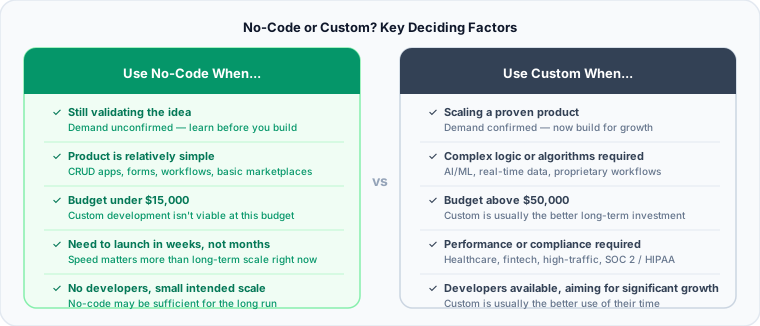
The questions worth asking honestly: Are you validating or scaling? Is the product simple or complex? What’s the budget and timeline? Do you have developers? How big is the intended scale?
If the answers are validating, relatively simple, budget-constrained, no developers, small scale: no-code. If the answers are scaling, complex logic, performance-critical, developers available, significant growth expected: custom. Most real situations sit somewhere between those poles, and the hybrid patterns above exist for exactly that reason.
On cost: no-code tools typically run $0 to $500 per month in platform fees, scaling with usage. A custom MVP built by a freelancer or small agency runs $15,000 to $75,000 or more upfront, with ongoing maintenance costs afterward. These figures reflect US market rates. Offshore development typically comes in 40-60% lower on the custom side. Below roughly $15,000 total budget, custom development is rarely viable. Above $50,000, it’s usually the better long-term investment. Between those numbers, complexity and timeline determine which direction makes more sense.
The right answer isn’t about pride in custom code or enthusiasm for no-code. It’s about what gets your product to customers fastest while setting up long-term success. Once you decide to go custom, our MVP Development guide and Startup Tech Stack guide will help you plan what to build and how.
Need help deciding between no-code and custom development? Talk to a technical advisor who can evaluate your specific needs.