The most common reason software projects go over budget, miss deadlines, or produce wrong outcomes isn’t bad development. It’s unclear requirements. When a developer builds something different from what you imagined, the root cause is almost always in the specification, not the execution. This guide shows you how to write requirements that developers can actually build from, even without a technical background.
Why Requirements Matter
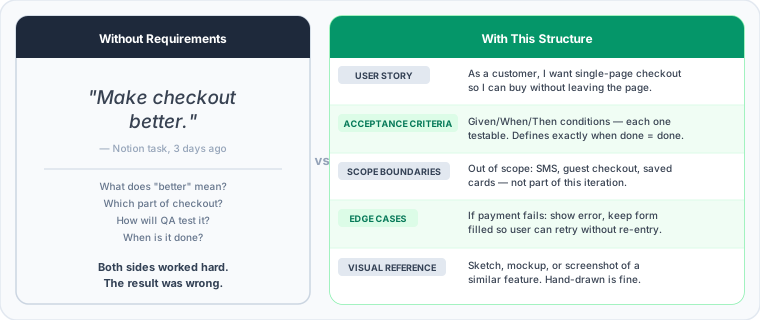
Vague requirements don’t just slow things down. They create a specific failure mode: both sides are working hard, both believe they’re doing the right thing, and the result is something nobody wanted. The developer interpreted your words one way. You meant something else. Neither of you was wrong; the specification was. The cost of that gap (rewriting working code, explaining why the delivered feature misses the mark, losing a week to a misunderstanding) compounds across every feature in a project.
Good requirements invert that. Developers know exactly what to build. Acceptance criteria catch issues before they reach QA. Defined scope enables realistic timelines. Everyone shares the same understanding of what “done” means before a line of code is written.
The Components of Good Requirements
User Story
A user story describes who needs something, what they need, and why. The format is:
As a [type of user], I want to [do something], so that [benefit/goal].
For example: “As a customer, I want to reset my password via email, so that I can regain access to my account.” Or: “As an admin, I want to export user data to CSV, so that I can analyze it in spreadsheets.”
The value of this format is that it keeps focus on user outcomes rather than technical implementation, provides context for why a feature matters, and constrains scope to what users actually need. When in doubt about whether a feature belongs in a release, the user story format makes it easy to ask: whose need does this serve, and is that need in scope?
Acceptance Criteria
Acceptance criteria define when a user story is complete: the specific conditions that must be met for the feature to be considered done. The Given/When/Then format makes these unambiguous:
Given [context], when [action], then [expected result].
For the password reset example:
- Given I’m on the login page, when I click “Forgot Password,” then I see a form to enter my email
- Given I’ve entered a valid email, when I submit the form, then I receive a reset email within 5 minutes
- Given I’ve received the reset email, when I click the link, then I can set a new password
- Given I’ve set a new password, when I log in with it, then I gain access to my account
- Given the reset link is older than 24 hours, when I click it, then I see an “expired link” message
These criteria tell the developer exactly what to build and tell QA exactly what to test. They prevent the “I thought it would do X” disputes that arise when done means different things to different people.
Scope Boundaries
Explicitly state what is not included. This is as important as stating what is. Without it, every related idea becomes a candidate for the current feature, and scope creep sets in before the first line of code is written.
For the password reset example, a scope boundary might read: “Out of scope for this iteration: SMS password reset (email only), social login integration, password strength requirements beyond basic validation, two-factor authentication.”
Edge Cases and Error Handling
Think through what happens when things go wrong before the developer has to. What if the user enters invalid data? What if the network fails mid-action? What if the user is logged out while completing a multi-step flow? What if multiple users trigger the same action simultaneously?
For password reset: if the email isn’t in the system, show a generic “If this email exists, you’ll receive instructions” message rather than confirming whether an account exists. If a user requests multiple resets, each new link invalidates the previous ones. If the link is expired, show a clear message with an option to request a new one.
Thinking through these scenarios before development prevents a category of bugs that are expensive to fix after the fact and erodes trust with users when they surface in production.
Visual References
Pictures reduce ambiguity more reliably than words. Include wireframes or sketches (hand-drawn is fine), screenshots of similar features in other products, rough mockups, or flow diagrams showing the user journey. Non-designers can use Figma (free tier), Balsamiq, or Whimsical. Even a photograph of a hand sketch is better than pure description. The goal is to give the developer a visual anchor that words alone can’t provide.
Writing Requirements: Step by Step
Start with the goal, not the feature. Before writing any requirements, answer three questions: what problem are you solving, who has this problem, and how will you know if you’ve solved it? Features exist to serve outcomes. If you start writing requirements without a clear outcome in mind, you’ll specify the wrong features.
Write user stories for each feature or capability. Identify the user type, state what they want to accomplish, and explain why they want it.
If you can’t complete the “so that” clause, it’s a sign the feature’s purpose isn’t clear yet. Don’t write the acceptance criteria until you can.
Define acceptance criteria for each user story using the Given/When/Then format. Be specific and testable. If an acceptance criterion can’t be verified by running a test or performing a specific action, it’s too vague.
Consider edge cases for each feature: what could go wrong, what unusual inputs users might attempt, and what happens under error conditions. These aren’t optional. They define the full scope of what needs to be built.
Add visual context: sketch the interface, show the user flow from start to finish, reference similar features in other products. Clarify what’s explicitly included and explicitly excluded. Document open questions that need answering before or during development.
Template: Feature Requirement
Feature Requirement Template
Given [context], when [action], then [result]
Given [context], when [action], then [result]
Given [context], when [action], then [result]
[Edge case]: [expected behavior]
[Error scenario]: [expected behavior]
[Feature not included in this iteration]
[Feature not included in this iteration]
Common Mistakes to Avoid
Describing implementation instead of outcome is the most common error. “Add a database table for wishlists with columns for user_id, product_id, and created_at” tells the developer how to build it. “Users can save products to a wishlist and view their saved items later” tells them what to build. Let developers decide the implementation. Your job is to define the outcome.
Being too vague produces vague results. “Make the checkout process better” can be interpreted ten different ways. “Reduce checkout to a single page where users can enter their shipping address, select a shipping speed, and complete payment without leaving the page” gives the developer exactly what to build. Specific requirements produce specific results.
Assuming context is another version of vagueness. “Add the standard login flow” assumes the developer knows your standard. They may not. “Implement email/password login with: email field, password field (masked with option to show), ‘Forgot password’ link, and ‘Submit’ button. Show error messages inline if fields are invalid” leaves nothing to interpretation.
Skipping unhappy paths is how bugs reach production. If a requirement doesn’t address what happens when things go wrong, the developer will make their own judgment call, and it may not match yours. “If payment fails, display the error message from the payment processor and keep the form filled so users can retry without re-entering information” is a complete requirement. Silence on error handling is not.
Changing requirements mid-development is sometimes unavoidable, but how you handle it matters. Acknowledge the change explicitly, understand the impact on timeline before agreeing to it, update the documentation, and don’t pretend the original requirement was different from what it was. Unacknowledged scope changes are how projects quietly go over budget.
Working with Developers on Requirements
Before development starts, walk through the requirements together. Encourage developers to ask questions: questions catch ambiguity early, before it becomes expensive to address. Explain the “why” behind features so developers can make good judgment calls on the implementation details you haven’t specified.
During development, be available. Slow responses to developer questions are a major source of delay. If developers suggest a better approach than what you specified, consider it: they may see something you don’t yet. Document any changes that emerge from these conversations.
After delivery, test against the acceptance criteria: does the feature do what the requirements said? Give specific feedback on what was unclear or misunderstood. The most valuable thing you can do after a requirement is misinterpreted is understand why, so you write it better next time.
When to Add More or Less Detail
More detail is warranted when working with new teams who don’t know your product, when features are complex or carry significant risk, when a requirement has been misunderstood before, or when multiple people need to align before development starts. Less detail is appropriate when working with a trusted team who knows your product well, when features are simple and well understood, or when you’re intentionally leaving room for the developer to propose the best implementation.
Start with the template, learn from what works and what doesn’t, and keep refining your approach. For more on working effectively as a non-technical founder, read the Non-Technical Founder’s Guide. If you’re about to start building your MVP, our MVP Development guide walks through the full process. When working with an offshore team, clear requirements are especially critical: see our offshore development guide for tips on structuring those engagements.
Need help translating your ideas into technical requirements? Connect with a technical advisor who can help you communicate effectively with developers.